The current stable release is 10.0.6 (August 29, 2026). If you are installing KiCad 10 now, get this version from the KiCad official site.
- Six bug-fix releases have shipped since 10.0.0: 10.0.1 / 10.0.2 / 10.0.3 / 10.0.4 / 10.0.5 / 10.0.6
- 10.0.6 was officially released on August 29, 2026. The project describes it as containing several critical bug fixes and recommends upgrading as soon as possible.
- 10.0.6 brings faster DRC, zone filling, and ratsnest drawing, plus crash fixes for autosave and for moving editor windows between monitors
- The Zone Manager crash that affected 10.0.1 was fixed in 10.0.2
Per-patch details are in the “10.0.x Update History” section later in this article.
Introduction: KiCad Enters a New Stage
On March 20, 2026, the open-source PCB design tool KiCad released its major version 10.0.0.
KiCad’s quality has risen sharply since version 5, shedding the “hobbyist-only tool” label. With version 10, the development team made a deliberate push toward replacing Altium Designer, Cadence Allegro, and Mentor PADS in professional workflows — adding features that have been cited for years as reasons not to adopt KiCad commercially.
According to the official blog, V10 includes new features, improvements, and hundreds of bug fixes — built from 7,609 unique commits and 2,105 merge requests (average review time dropped from 3 days to 18 hours). Libraries were significantly expanded: +952 symbols, +1,216 footprints, +386 3D models.
What this article covers:
- The 3 major importers (migration from commercial CAD tools)
- Key new features that change your design workflow
- Schematic editor and PCB editor improvements separately
- UI/UX changes
- Upgrade considerations and migration notes
🔌 Three New Importers: The Wall Between KiCad and Commercial EDA is Nearly Gone
The standout announcement is three new importers for commercial EDA formats. The official blog describes them as the result of “months of reverse-engineering, testing, and refinement”.
“I received an Allegro .brd file and can’t open it in KiCad” — that friction has been a real obstacle for handoffs and cross-team collaboration. KiCad 10 removes most of it.
Cadence Allegro Importer
Supported format: .brd files (versions 16–23)
Cadence Allegro is the dominant high-end EDA tool in telecom, semiconductor, and industrial electronics at large corporations. Currently, only the board layout (.brd) is imported — schematics (Concept HDL / OrCAD Capture) are not yet supported. Schema migration requires EDIF or similar intermediary formats.
What imports:
- Multiple pad shapes (round, square, rectangle, octagon, etc.)
- Traces, vias, copper fill zones
- Physical constraint sets → converted to KiCad net classes
Mentor PADS Importer
Supported format: .asc files
Mentor PADS (now Siemens EDA) has been widely used in mid-size companies and education for decades. This importer has the broadest coverage of the three — supporting both schematics and boards.
What imports:
- Multi-unit symbol reconstruction
- Hierarchical structure preservation
- Design rules (clearance, trace width) extraction
- Differential pairs → KiCad DRC rules
gEDA / Lepton EDA Importer
Supported formats: .sch, .pcb, .fp files
The longtime open-source EDA suite popular in the Linux community. Full coverage across schematics, board layout, and footprint libraries — including library browsing, hierarchical sub-schematics, and multi-slot components.
Importer Summary
| Tool | Format | Board | Schematic | Primary Users |
|---|---|---|---|---|
| Cadence Allegro | .brd (v16–23) |
✅ | ❌ | Large enterprises, semiconductor, telecom |
| Mentor PADS | .asc |
✅ | ✅ | Mid-size companies, education |
| gEDA / Lepton EDA | .sch/.pcb/.fp |
✅ | ✅ | Linux / OSS community |
All importers are accessible via File menu in KiCad. Combined with the existing Altium importer, virtually every major commercial EDA format can now be opened in KiCad.
These importers are reverse-engineered implementations. Complex rule configurations, custom fonts, and some proprietary design objects may require manual correction after import. Always run DRC and verify your netlist and footprints after importing.
📐 Schematic Editor: New Features
Design Variants
Design Variants let you manage multiple product specifications — with slightly different BOM attributes — from a single schematic. Vary component values or DNP status per variant without maintaining separate files.
Altium Designer has had Design Variants since around 2015. “No variant support in KiCad” has been a frequently cited reason to stick with commercial tools for production work. The community reaction to this addition has been notably enthusiastic: “This was the last reason I needed to stay on Altium.”
Typical use cases:
- “Basic model” vs “Premium model” with different component values
- DNP (Do Not Populate) management for production runs
- Regional variants (100V vs 240V power supply configurations)
Previously: maintain separate files for each variant, manually propagate every change across them.
Now: one schematic file manages all variants; BOM output is automatic per variant. 3D viewer also hides DNP components per variant — mechanical team reviews become variant-specific.
Hop-Over Arcs
Crossing wires that are not electrically connected can now display a small semicircular arc (hop-over) at the intersection. Readable complex schematics at a glance — no more ambiguity about which lines are joined.
How to enable:
- Schematic Editor → File → Schematic Setup
- Navigate to General → Formatting
- Change Hop-over size from
Noneto your preferred size
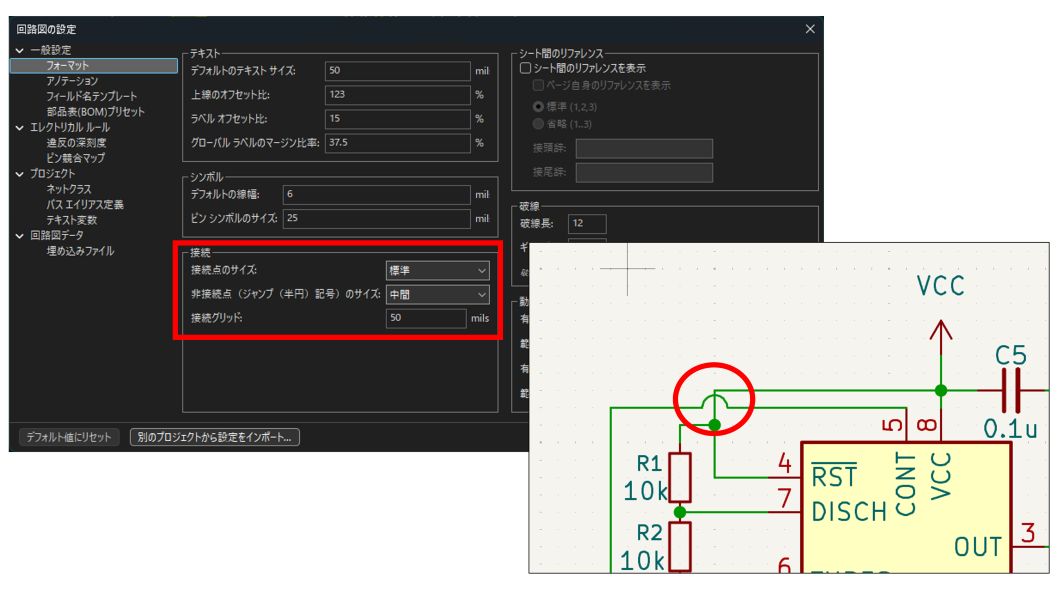
Schematic Setup → General → Formatting — set Hop-over size here
- One size applies to all hop-overs in the schematic (no per-wire overrides)
- Visual display only — no effect on electrical connectivity
- The rule remains: junction dot (●) = connected; no dot = not connected
Jumper Support
Solder jumpers and zero-ohm resistors on PCBs are “open in the schematic, but solder-connect specific pads to switch modes.” Previously, representing this relationship correctly between schematic symbols and footprint pads was awkward — DRC false errors and netlist inconsistencies were common.
Now: symbol pins and footprint pads can be formally defined as “internally connected when bridged,” reducing false DRC hits and producing clean netlists for:
- Solder jumpers — pads bridged by solder to switch modes
- Zero-ohm resistors — routing convenience or optional population
- Jumper headers — jumper cap selects the connection
Combined with Design Variants, you can manage “this jumper is SHORT in Model A, OPEN in Model B” cleanly.
Grouping in Schematic Editor
The grouping feature already present in the PCB editor is now available in the schematic editor. Select multiple symbols, group them, and move/copy/manage them as a unit. Useful for organizing large, complex schematics.
Other Schematic Editor Improvements
- CSV import/export for pin tables — edit large symbol pin definitions in a spreadsheet and import back
- Undo/redo inside dialogs — revert changes before closing a dialog box
🖥️ PCB Editor: New Features
Graphical DRC Rule Editor
DRC (Design Rule Check) verifies that your board meets manufacturing constraints — trace spacing, via sizes, clearances. Custom rules previously required writing S-expression text directly, which was a barrier for many users.
Now: a GUI lets you define conditions (“which net classes,” “which layers,” “what clearance value”) through menus. Existing text-based rules continue to work alongside GUI-defined rules.
Time-Domain Track Tuning
High-speed designs — DDR memory, USB, HDMI — require length matching so signals arrive simultaneously. Previous KiCad constrained this by distance (mm). KiCad 10 adds time-domain constraints (picoseconds).
The PCB editor now accounts for signal propagation velocity based on the board’s dielectric constant (ε_r) — so you’re aligning electrical timing, not just physical length. This matters when trace routing goes through different dielectric environments.
Not relevant for most hobby projects, but a meaningful addition for production-grade high-speed designs.
PCB Design Blocks
If you’re placing the same sub-circuit 8 times on a board (8-channel ADC input, repeated filter stages, etc.), manually re-placing and re-routing each instance is tedious and error-prone.
Design Blocks let you save a placement and routing arrangement to a library and recall it for each instance. Each placed block becomes an independent copy (source changes don’t propagate automatically) — think of it as a re-usable layout template.
Inner Layer Objects
On 4-layer or 6-layer boards, copper pours and keepouts can now be assigned to inner copper layers — not just F.Cu and B.Cu. Relevant for BGA via keepouts and impedance-controlled component handling.
Pin / Gate Swap
For ICs with multiple identical functional units (e.g., 74HC00 with four NAND gates), routing is often easier if you can move which gate goes where. Previously, swapping gates broke schematic-PCB consistency and required manual corrections.
Now: pin and gate assignments can be swapped while maintaining full netlist consistency — no DRC errors, correct BOM output.
Other PCB Editor Improvements
- Lasso selection — freeform area selection instead of only rectangular
- Barcode support — place QR codes and barcodes directly on the PCB for production traceability
- Hatched copper fills — display large copper pours as hatching to distinguish them from routing
- 3D PDF export — export the 3D board view as a PDF for mechanical team review
- Native rounded rectangles — corner-rounded pads and silkscreen shapes as native objects, not line approximations
🎨 UI / UX Improvements
Windows Dark Mode
Through collaboration with wxWidgets, Windows system dark mode is now honored.
| Area | Behavior |
|---|---|
| Window frame, title bar, menus | Follows OS dark setting automatically |
| Schematic / PCB editor canvas | Requires separate color theme configuration |
The canvas background doesn’t change from OS settings alone. To darken the editor workspace: go to Preferences → Colors and select a dark theme, or load a community dark theme file. The fastest standard option is KiCad Default Dark in the Colors preferences.
Toolbar Customization
Each editor window’s toolbar can now be freely rearranged by the user. Show only the tools you actually use; arrange them in the order that fits your workflow.
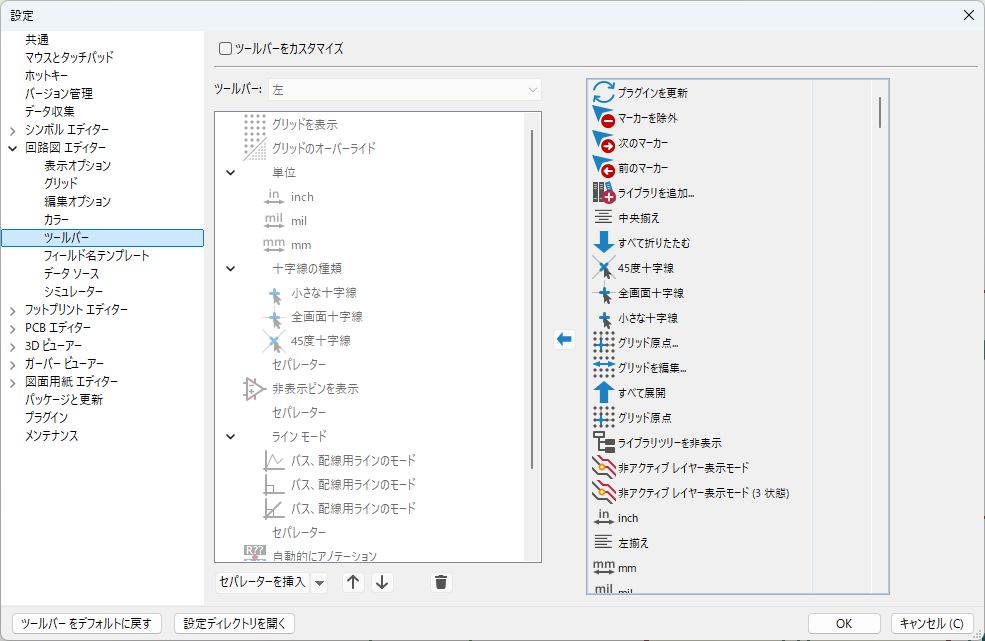
Drag and reorder toolbar items to match your workflow
Once you have the feature overview, try the full design flow:
- Build your first ESP32 board in KiCad → ESP32 Network Clock — PCB Design with KiCad and JLCPCB
- Running out of GPIO pins? → Expanding ESP32 GPIO by 16 pins with MCP23017
🔄 10.0.x Update History
KiCad has been shipping bug-fix releases every 1–1.5 months since 10.0.0. The table below focuses on fixes that matter for hobbyist and individual PCB work — internal refactors and platform-specific minor fixes are omitted.
| Version | Released | Notable fixes |
|---|---|---|
| 10.0.1 | 2026-04-15 | Crash fixes for polygon shape property editing, keyboard navigation in the preferences dialog, custom toolbar interaction, and removing pins from symbols / fixed incorrect net-combining when 3+ nets across multiple sheets use global labels / Allegro importer no longer imports V16.x through-hole pads as NPTH / Altium importer crash fixed / faster loading of large library tables |
| 10.0.2 | 2026-05-09 | Zone Manager dialog crash fixed (#23951) / Eagle importer crash on empty polygons / crashes when changing text properties and editing text box fill / edge clearance false errors on rounded rectangles / solder mask handling for pads with per-layer shapes / zone filling performance, teardrop asymmetry, and “thermal reliefs to nowhere” / 3D viewer rendering of rounded rectangles and NPTH holes |
| 10.0.3 | 2026-05-15 | Autosave recovery dialog now lets you choose per file whether to restore / added a Zone Manager shortcut to the toolbar context menu / fixed Altium footprint library import crash / improved PADS board import (zone fill inflation, polygon handling) / pin edit table now sorted by pin number |
| 10.0.4 | 2026-06-21 | Crash on exit fixed (#23373) / corrupted DXF export fixed (#24405) / infinite wait on 2-thread CPUs when loading footprints and symbols in the background fixed (#24420) / false annular ring DRC errors on overlapping same-number pads (#24340) and missing hole clearance violations on the first DRC run (#24355) / Eagle schematic import variant and polygon handling / washed-out copper in Realtime 3D view (#23211) |
| 10.0.5 | 2026-07-22 | Stable release with 200+ bug fixes: via net swap on undo/redo, teardrop net shorts, crash on exit, corrupted PDF output, and more. |
| 10.0.6 | 2026-08-29 | DRC providers parallelized and footprint courtyards spatially indexed for faster DRC / faster zone filling, curved ratsnest drawing, and layer/high-contrast switching / false DRC errors on net-tie footprints eliminated / crash fixes for autosaving a freed document, opening Zone Manager, running DRC, closing an editor window, and moving windows between monitors / memory leak when clearing rule-check results fixed / missing junctions at four-wire stub crosses / variant edits now propagate to every unit of a multi-unit symbol / LTspice import compatibility (.include directives preferred, .tran converted to ngspice form, pin numbers honoring SpiceOrder) / Altium (footprint origin and keepouts), Eagle (through-hole pads), Allegro (reference field collisions) import and IPC-2581 export fixes / .kicad_prj and .kicad_prl are no longer saved when nothing changed |
The 10.0.2 announcement states: “This release contains several critical bug fixes so please consider upgrading as soon as possible.” The same sentence accompanies the latest 10.0.6 announcement. If you are still on 10.0.0 or 10.0.1, moving to at least 10.0.2 is worthwhile.
The 10.0.4 fix for 2-thread CPUs is worth calling out — if you run KiCad on an older laptop or a low-spec secondary machine and have seen it hang while loading libraries, check your version first.
10.0.6 is largely a performance release. Parallelized DRC providers, spatially indexed footprint courtyards, a dependency-graph zone fill, and adaptive tessellation for curved ratsnests all target the same moment — the wait after you finish routing and hit DRC. It also stops the false DRC errors on net-tie footprints, so designs that use net ties for split grounds get a cleaner error list.
This article previously stated, regarding 10.0.2 RC1, that a PCB editor startup crash on Windows 11 had been reported, and advised waiting for the final release or reverting to 10.0.1.
On re-checking, neither the official 10.0.2 RC1 announcement nor the 10.0.2 release notes mention this issue. Three stable releases have shipped since then, and advising readers to revert to 10.0.1 would now do more harm than good. The note has therefore been removed.
✅ Should You Upgrade? Migration Notes
Upgrade Immediately If You:
- Receive Allegro or PADS files from clients or colleagues — the three importers alone justify upgrading to V10
- Want custom DRC rules but found S-expression syntax off-putting — the graphical editor solves this
- Work with variant products or DNP management — Design Variants directly addresses this
- Design high-speed boards — time-domain track tuning is worth trying
Migration Caveats
| Item | Details |
|---|---|
| Not backwards-compatible | Files saved in KiCad 10.0 cannot be opened in V9 or earlier |
| Coordinate team upgrades | Everyone should upgrade together, or manage with branching |
| Post-import verification required | After commercial CAD import, always run DRC and verify netlist |
| Python plugin compatibility | The Python API changed in V10. Plugins like board2pdf in jobsets that worked in V9 may fail. Verify plugin V10 support before migrating |
| Don’t install alongside V9 | Installing 10.0.1 without first removing V9 can cause library loading errors. Uninstall V9 first, or test in a separate environment |
| v10.0.0 grouping crash | Fixed in 10.0.1 (released April 15, 2026). Update to 10.0.1 to resolve. |
| Zone Manager crash (10.0.1) | Selecting a net name in Zone Manager could crash the PCB editor. Fixed in 10.0.2 (May 9, 2026). If you are still on 10.0.1, upgrade to 10.0.2 or later |
Recommended Migration Steps from V9
- Back up your current project (git commit or ZIP)
- Download and install V10 from the KiCad official site
- Open your backed-up project in V10 and run DRC
- Fix any errors, then save in V10 format
- Notify team members to upgrade
Community Reaction
Hacker News and Engineer Forums
KiCad 10.0 drew significant attention on Hacker News. The reaction was broadly positive, with a few themes:
- Hop-over arcs and grouping — “features people have been requesting for years, finally here”
- Allegro importer — recognized as industry-significant: “no more needing Cadence’s viewer license just to look at a board file”
- One user donated $250 and wrote “I try to donate what I’d pay for a commercial equivalent to the open-source projects I rely on” — others echoed the sentiment
- FreeCAD community officially celebrated the KiCad 10 release on their blog
“Reasons Not to Use KiCad” Are Running Out
The addition of Design Variants is the headline feature for the professional community. “No Variants support” has been cited for years as the single biggest reason not to adopt KiCad commercially. That reason is now gone.
By the numbers: KiCad appears in job postings at +400% vs 2022. Arduino, SparkFun, and reportedly some Tesla projects have adopted it. The fact that Altium’s official website now actively maintains a KiCad comparison page signals that commercial tools are watching.
Still Rough Around the Edges
Version 10.0.0 is a large first release in a major cycle, and early friction is expected:
- Variants documentation is sparse — the feature exists but getting started requires forum searching
- Graphical DRC editor — functional, but the UX still feels early-stage
- Time-domain tuning — propagation velocity must be entered manually; Altium’s auto field solver is still ahead
V9 went from 9.0.0 to 9.0.8 with continuous patches, and V10 is on the same trajectory — it reached 10.0.6 within about five months of release (see “10.0.x Update History”).
Summary
KiCad 10.0 makes three structural moves:
① Breaking down the commercial EDA wall
Allegro, PADS, and gEDA importers dramatically reduce the friction of “I got this file from a client and can’t open it.” Cross-tool collaboration and handoffs become practical.
② Removing workflow compromises
Design Variants, graphical DRC, and time-domain tuning address areas where KiCad users were previously working around tool limitations. You can express design intent more directly.
③ Scaling up for professional and team use
PCB Design Blocks, pin/gate swap, and variant management are aimed squarely at multi-person teams, high-variant product lines, and multi-layer production boards.
Feature summary:
| Category | Key New Features |
|---|---|
| Migration | Allegro, PADS, gEDA importers |
| Schematic | Design Variants, hop-over arcs, jumper support, grouping |
| PCB | Graphical DRC editor, time-domain tuning, Design Blocks, pin/gate swap |
| Output | 3D PDF export |
| UI | Windows dark mode, toolbar customization, lasso selection, barcode support |
Frequently Asked Questions
Q: When was KiCad 10.0 released?
A: KiCad 10.0.0 was officially released on March 20, 2026. Bug-fix releases have followed regularly since; as of August 30, 2026 the current stable release is 10.0.6 (August 29, 2026).
Q: Which version should I install today?
A: 10.0.6. It carries every earlier fix for issues you are likely to hit in real work — crash on exit, corrupted DXF export, the library-loading hang on 2-thread CPUs, via net swaps on undo/redo — and adds faster DRC and zone filling, an end to false DRC errors on net-tie footprints, and crash fixes for autosave and for moving editor windows between monitors.
Q: Can KiCad 10.0 open Altium Designer files?
A: Yes. KiCad has included an Altium importer for several versions. KiCad 10 adds three more: Cadence Allegro (.brd), Mentor PADS (.asc), and gEDA. Combined, virtually every major commercial EDA format is now supported.
Q: Can I open KiCad 9 projects in V10?
A: Yes — but once you save in V10 format, the file cannot be opened in V9 or earlier. If your team hasn’t all upgraded yet, use version control branching or keep a V9 backup before saving in V10.
Q: What are Design Variants and who should use them?
A: Design Variants let you manage multiple product configurations (e.g., Standard / Premium model) from a single schematic. Component values and DNP (Do Not Populate) status can vary per variant, and BOM output is generated separately for each. Anyone producing multiple product SKUs from one board design should use this.
Q: Is KiCad free for commercial use?
A: Yes. KiCad is open-source software, free for any use including commercial. Download from the official site.
Related Articles
Design with KiCad — practical walkthroughs:
- ESP32 Network Clock — PCB Design with KiCad and JLCPCB
- Expanding ESP32 GPIO by 16 pins with MCP23017
- 74HC595 Shift Register — Unlimited GPIO Expansion for Arduino
Microcontroller firmware (breadboard → production):
References
- KiCad Official Site
- KiCad Blog: Version 10.0.0 Released
- KiCad Blog: Three New Importers in KiCad 10: Allegro, PADS, and gEDA
Release notes (sources for the update history):