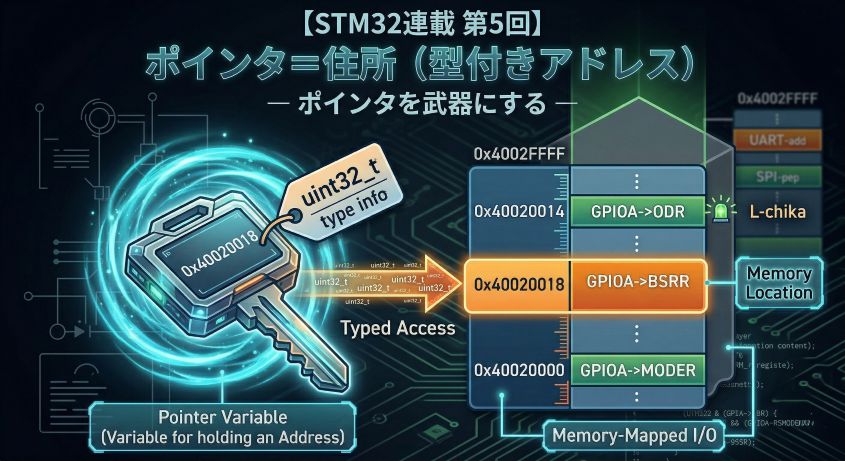
In Episode 5 we fully internalized that a pointer is a typed address. Declaration *, dereference *, casts, the -> operator — we mastered the correct way to use them all.
This time we flip to the dark side. What actually happens when you get a pointer wrong?
HardFault, undefined behavior (UB), silent memory corruption — “it was working fine and suddenly broke,” “the debugger stopped at a strange place,” “only the release build reproduces it” — the root cause lurking behind these all-too-familiar embedded symptoms is almost always a pointer accident.
Knowing how things break is the most powerful way to learn. This time we deliberately step on the land mines and watch what happens under the debugger.
📖 Previous Article
#5: Pointers = Addresses with Types — Turning Pointers into a Weapon
📍 Series Index
✅ What You'll Be Able to Do After This Article
- Explain the mechanism by which NULL dereference causes a HardFault
- Understand why a dangling pointer "breaks silently"
- Explain with a stack diagram why returning the address of a local variable is dangerous
- Understand why out-of-bounds array access doesn't produce a compile error
- Grasp the concept of undefined behavior (UB) in C and its relationship to optimization
- Read the fault location and Fault Status registers in the debugger when a HardFault occurs
Table of Contents
- Experiment Environment and Ground Rules
- 💥 Accident 1: NULL Dereference
- 🕵️ Accident 2: Dangling Pointer
- 🕵️ Accident 3: Stack Lifetime (Returning the Address of a Local Variable)
- 💥 Accident 4: Out-of-Bounds Array Access
- 🎲 Accident 5: Undefined Behavior (UB)
- 🎲 Accident 6: Unexpected Behavior Changes Due to Optimization
- 🔬 Practice: Break-it Code + Debugger Observation
- 🛡️ Habits That Prevent Accidents
- Summary
Experiment Environment and Ground Rules
This time we’re writing code that deliberately breaks things. Some accident patterns only reproduce in a release build (-O2) and not in a debug build (-O0).
Switching Build Configurations in STM32CubeIDE
Having Debug and Release build configurations is standard practice in Eclipse-based IDEs (STM32CubeIDE is one of them). Visual Studio, Keil MDK, and other IDEs have the same concept. STM32CubeIDE provides both configurations by default.
Switching the configuration for debug execution: After building, click the green bug icon ▼ and select the .elf file for the configuration you want to use.
Debug/project.elf    ← Debug build output (use this with the debugger)
Release/project.elf  ← Release build output
⚠️ Note: In a Release build, optimization often places variables in registers, so the debugger's variable watch may not display values correctly. You can use it to confirm the broken behavior, but stepping through code won't be reliable.
What Changes Between Optimization Levels
“Optimization” means the compiler rewrites your code to achieve the same behavior faster and smaller. The higher the level, the more the generated machine code diverges from what you wrote in C.
Overview of Each Level
| Flag | CubeIDE label | Main effect |
|---|---|---|
-O0 |
Optimize for debug | No optimization. C code is translated almost literally to machine code |
-O1 |
Optimize | Removes side-effect-free computations, simple inlining |
-O2 |
Optimize more | Loop unrolling, function inlining, variable register promotion |
-O3 |
Optimize most | More aggressive inlining and vectorization (rare in embedded) |
-Os |
Optimize for size | Code size priority (disables some -O2 optimizations) |
What Changes Between -O0 and -O2
Let’s look at a concrete example:
int loop_sum(void) {
    int sum = 0;
    for (int i = 0; i < 4; i++) {
        sum += i;
    }
    return sum;
}
What -O0 generates (conceptual):
// Faithfully translates the for loop to machine code
// i stored in RAM → read/write RAM every iteration → compare → branch
mov  r3, #0        // sum = 0
mov  r2, #0        // i = 0
loop:
  add  r3, r3, r2  // sum += i
  add  r2, r2, #1  // i++
  cmp  r2, #4      // i < 4 ?
  blt  loop        // branch
mov  r0, r3        // return sum
What -O2 generates (conceptual):
// The compiler pre-computed "sum is always 6"
// The entire loop disappears
mov  r0, #6        // return 6 (computed at compile time)
The loop shrank to one instruction. That’s the power of optimization.
How Optimization Changes the Way Bugs Appear
This is the most important point in this article. Let’s understand the two cases that produce “works in debug build, breaks in release build.”
Case 1: The compiler “relocates” a variable from memory to a register
The setup: a timer interrupt sets flag to 1, and the main loop waits for it before proceeding.
// ── Global variable ──────────────────────────────
uint32_t flag = 0;   // shared between interrupt and main loop

// ── Interrupt handler (called automatically by the timer) ──
void TIM2_IRQHandler(void) {
    flag = 1;   // ← writes 1 to flag in RAM
}

// ── Main loop ───────────────────────────────
int main(void) {
    // ... initialization ...

    while (flag == 0) {
        // wait here until flag becomes 1
    }

    // continue once flag == 1
    do_something();
}
How this differs between -O0 and -O2, from the CPU’s perspective:
The CPU has ultra-fast working scratch pads called registers (r0–r12, etc.) — more than 100× faster than RAM, but only a handful of them. The compiler decides which values to keep in registers.
[Inside CPU]  super fast       [Outside CPU]  slow, large
+---------------------+        +---------------------------+
|  Registers          |        |  RAM                      |
|    r0 = 0           |<------>|  0x20000000: flag = 0     |
|    r1 = ...         |        |  0x20000004: ...          |
+---------------------+        +---------------------------+
  CPU's working scratch pad        where data actually lives
  (few, ultra-fast)                (large, slower than CPU)
With -O0 (no optimization):
Each iteration of the while loop:
  1. Read flag from RAM  →  r0 = RAM[flag]   (check if 0 or 1)
  2. r0 == 0? → Yes → continue loop
  3. Interrupt fires, TIM2_IRQHandler writes 1 to flag in RAM
  4. Next iteration reads RAM again  →  r0 = 1
  5. r0 == 0? → No → exits loop ✅
With -O2 (optimized):
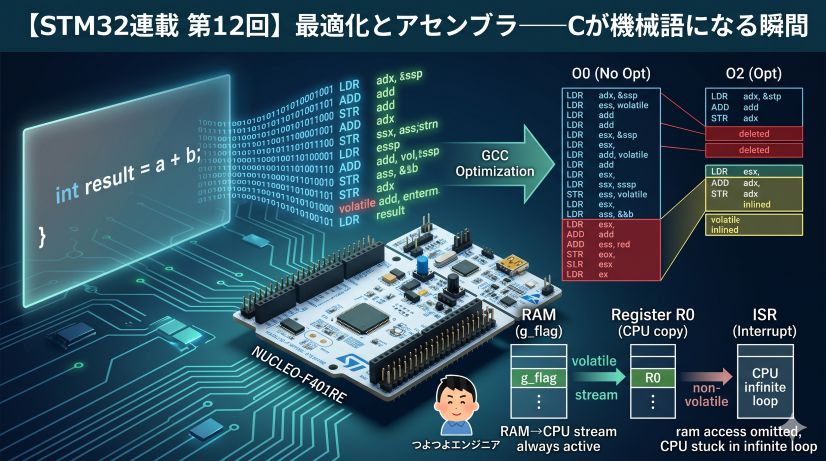
The compiler analyzes the while (flag == 0) loop body and concludes: “there is no code inside this loop that modifies flag.” It optimizes as follows:
Once at the start:
  r0 = RAM[flag]   (= 0)

Every iteration after that:
  r0 == 0? → Yes → continue loop   ← never reads RAM again, only r0
  r0 == 0? → Yes → continue loop
  r0 == 0? → Yes → continue loop
  ...(infinite loop)
Even when the interrupt fires and sets flag = 1 in RAM, the main loop is no longer looking at RAM. r0 still holds the 0 it read at the start. Result: infinite loop.
With -O0, RAM is re-read every iteration so it works correctly. With -O2, RAM is never read again so it breaks. This is the true cause of “works in debug build.”
The fix: Add volatile to flag.
volatile uint32_t flag = 0; // ← just add volatile
volatile is the instruction: “This variable may change due to external factors (like interrupts) that the compiler doesn’t know about. Always read from memory every time.” This forces -O2 to re-read RAM every iteration.
Case 2: The compiler deletes an entire branch it judges “will never be reached”
int32_t x = INT32_MAX;   // x = 2,147,483,647 (maximum value)
x = x + 1;               // ① signed integer overflow → UB

if (x < 0) {             // ② will x be negative?
    error_handler();
}
The compiler follows the C language specification and “reasons” as follows:
C spec: "Signed integers do not overflow (by definition)"
  ↓
Compiler: "① x + 1 does not overflow (because the spec says UB)"
  ↓
Compiler: "If INT32_MAX + 1 doesn't overflow, the result must be positive"
  ↓
Compiler: "② x < 0 is always false → this if-branch is unnecessary"
  ↓
Compiler: deletes the entire call to error_handler()
With -O0, code is executed as written, so error_handler() is called. But with -O2, the compiler concludes it’s “logically unnecessary” and removes that code entirely.
The same C code behaves in completely opposite ways depending on the optimization level.
💡 The common message in both cases:
The compiler optimizes under the assumption that C code is written correctly.
Using a variable that can change from outside without volatile, or writing code that contains UB — these betray that assumption. The result is the most painful class of bug: works in debug build, breaks in release build.
Each experiment is labeled with these symbols:
| Symbol | Meaning |
|---|---|
| 💥 Immediate crash | Running this almost certainly causes a HardFault or runaway |
| 🕵️ Breaks silently | Appears to work but data is being corrupted internally |
| 🎲 UB (undefined behavior) | Result varies by compiler; the most treacherous pattern |
All experiment code is written inside main() in main.c, or as standalone functions. Work through them while observing with the STM32CubeIDE debugger (ST-Link).
💥 Accident 1: NULL Dereference
What Happens
When you try to dereference a NULL pointer (a pointer holding 0x00000000), the STM32 detects an abnormal condition at the hardware level and a HardFault exception is raised.
💬 What is a HardFault exception?
The Cortex-M4 CPU’s emergency handler, called automatically when it detects an “unauthorized memory access” or “invalid instruction.” It’s similar to a “Segmentation fault” on a PC OS. On a microcontroller without an OS, the default behavior is to enter theHardFault_Handlerinfinite loop, halting the program completely.
// ❌ Pattern 1: Write to NULL pointer (may not fault in some environments)
uint32_t* ptr = NULL;
*ptr = 42;

// 💥 Pattern 2: Call a NULL function pointer (guaranteed HardFault)
void (*fn)(void) = NULL;
fn();   // Jump to address 0 → invalid instruction → certain HardFault
Why It Causes a HardFault
In the STM32 (Cortex-M4) memory map, the area near address 0x00000000 is Flash (or unused). A write to address 0 is rejected by the CPU’s MPU (Memory Protection Unit) or as a bus fault.
💬 What is the MPU (Memory Protection Unit)?
A hardware feature that lets you configure rules like “writes to this address range are forbidden.” The STM32F401 has an MPU, but it’s disabled by default. Even with the MPU disabled, writes to address 0 are detected as a bus error (BusFault) and escalated to a HardFault.
Cortex-M4 fault sequence:

ptr = 0x00000000
   ↓
*ptr = 42  // write instruction to address 0
   ↓
Bus or MPU detects access violation
   ↓
Jump to HardFault exception handler
   ↓
Default handler: infinite loop (while(1))
Observing in the Debugger
Open main.c and add the following code between /* USER CODE BEGIN 2 */ and /* USER CODE END 2 */. This area is a “user code protected zone” that won’t be erased when CubeMX regenerates code.
int main(void)
{
  HAL_Init();
  SystemClock_Config();
  MX_GPIO_Init();

  /* USER CODE BEGIN 2 */

  /* Experiment 1: NULL dereference (guaranteed HardFault method) */
  void (*fn)(void) = NULL;   // create a NULL function pointer
  fn();                      // ← put a breakpoint here and press F6 to single-step

  /* USER CODE END 2 */

  while (1)
  {
  }
}
💬 Why use a function pointer?
Writing*(uint32_t*)NULL = value;on the STM32F401 may silently fail without a HardFault, because address 0 is mapped as an alias of Flash and writes may be ignored. Calling a NULL function pointer (jumping to address 0) causes the CPU to try executing an invalid instruction, producing a guaranteed HardFault.
Debug procedure:
- Set a breakpoint on the
fn();line (double-click the line number → blue dot ●) - Start debug execution with F11 or the bug icon
- When execution stops at the breakpoint, press
F6(step over) once - The debugger automatically jumps to and stops at
HardFault_Handler
STM32CubeIDE’s debugger stops at HardFault_Handler.
⚠️ Image not found: /posts/stm32-episode06/debug_hardfault_stop.jpg
Confirming the HardFault
💬 Reading the cause from SCB registers:
In the debugger, go to the Expressions tab → Add new expression and enter these addresses. While stopped in HardFault_Handler, values are highlighted in red.*(uint32_t*)0xE000ED28 *(uint32_t*)0xE000ED2CWhen calling a NULL function pointer (
fn()), the actual values displayed are:
Register Address Measured (decimal) Measured (hex) Meaning CFSR 0xE000ED28131072 0x00020000INVSTATE: tried to execute a non-Thumb instruction HFSR 0xE000ED2C1073741824 0x40000000FORCED: a lower-priority fault was escalated to HardFault ⚠️ Image not found: /posts/stm32-episode06/debug_expressions_hardfault.jpg
💡 HardFault is an “escalated” error:
HardFault doesn’t occur in isolation — in most cases it’s the result of a BusFault / MemManage Fault / UsageFault being escalated. TheFORCEDbit in HFSR (0x40000000) means exactly that: “a lower-priority fault occurred and was escalated to HardFault.” In this case, INVSTATE is a type of UsageFault, escalated to HardFault.
Why does INVSTATE occur?
ARM processors have two instruction sets (types of machine code the CPU can interpret):
Mode Instruction width Characteristics ARM mode 32-bit fixed Legacy instruction set. High performance but larger code size Thumb mode 16/32-bit mixed Compressed form of ARM mode. Memory-efficient and effective Cortex-M series (what STM32 uses) only supports Thumb mode. ARM mode has been removed.
CPU series Primary use ARM mode Thumb mode Cortex-M (STM32, nRF5x, etc.) Microcontrollers, embedded ❌ None ✅ Only Cortex-A (Raspberry Pi, smartphones, etc.) Linux, high-performance apps ✅ Yes ✅ Yes Cortex-R (automotive, storage control, etc.) Real-time, high-reliability ✅ Yes ✅ Yes AVR (Arduino Uno’s ATmega) Microcontrollers — — (proprietary ISA) Cortex-M deliberately omits ARM mode to minimize code size and power consumption. The Thumb-2 extension it uses instead supports 32-bit instructions, so there’s virtually no performance penalty.
How does the CPU know to execute in Thumb mode? The least significant bit (LSB) of function pointer addresses.
Address 0x08000001 → LSB = 1 → Execute in Thumb mode (normal)
Address 0x08000000 → LSB = 0 → Execute in ARM mode (not supported on Cortex-M!)
Normally, the compiler automatically sets function pointer LSBs to 1. But
NULL(=0x00000000) has LSB = 0, which means “execute in ARM mode.” Since Cortex-M has no ARM mode, an INVSTATE (Invalid State) fault occurs and is escalated to HardFault.
⚠️ In real embedded development
Code with omitted NULL checks is running with a time bomb. It's "fine while it works," but the moment it calls an uninitialized function pointer or unregistered callback, it explodes. HAL library callbacks are defined as __weak empty functions specifically to prevent this accident.
Prevention
// ✅ Always NULL-check before using a pointer
if (ptr != NULL) {
    *ptr = 42;
}

// ✅ Explicitly use NULL during initialization to represent "not set"
typedef void (*callback_t)(void);
callback_t on_complete = NULL;   // intentional NULL

// Don't call before registering
if (on_complete != NULL) {
    on_complete();
}
What is NULL?
NULL is a sentinel value meaning “a pointer that points nowhere.” Its actual value is just 0.
// Using NULL
uint32_t* ptr = NULL;

// This means exactly the same thing
uint32_t* ptr = 0;
Both express “ptr doesn’t point to anything.”
Common usage: Initialize a pointer to “not yet usable” state and NULL-check before use.
uint32_t* ptr = NULL;   // ← explicitly "not pointing to anything yet"

// ... later, assign an address to ptr ...

if (ptr != NULL) {
    *ptr = 42;   // ← use only after NULL check
}
This habit alone prevents the majority of NULL dereference accidents.
🕵️ Accident 2: Dangling Pointer
What is a “Dangling Pointer”?
A dangling pointer is “a pointer that was once valid but now points to an invalid location.”
💡 In embedded development, the “returning a local variable’s address” pattern (Accident 3 below) is far more commonly encountered than
malloc. It’s a type of dangling pointer.
Most typical example (in PC-style code):
uint32_t* ptr = (uint32_t*)malloc(4);   // allocate memory
*ptr = 100;
free(ptr);                               // release memory

// ↓ ptr still holds the same address (dangling!)
*ptr = 200;   // 🕵️ write to already-freed memory
Why It Breaks Silently
After free(), ptr’s value (the address) doesn’t change. The write succeeds somewhere in memory. The result:
- May not break immediately (the freed region hasn’t been reallocated yet)
- Corrupts another variable or the malloc management structure
- Surfaces much later as a mysterious bug
This is why it “breaks silently.”
Reality in STM32 Development
Embedded code rarely uses malloc/free, but the same pattern appears in a different form:
💬 Why avoid malloc/free in bare-metal embedded?
① Memory fragmentation: repeated allocation and deallocation leaves free memory in small, unusable pieces, eventually making it impossible to allocate larger blocks.
② Fixed heap size: a microcontroller’s RAM is only tens to hundreds of KB, and if the heap runs out, malloc returns NULL.
③ Real-time disruption: malloc’s execution time is non-deterministic and can delay interrupt response.
In embedded, the basic design principle is “allocate all needed memory at compile time; don’t dynamically grow or shrink.”
// ❌ A global pointer pointing to a local variable on the stack
static uint32_t* g_sensor_ptr;

void init_sensor(void) {
    uint32_t local_val = 0;         // ← placed on the stack
    g_sensor_ptr = &local_val;      // ← save address in global
}   // ← local_val's lifetime ends here (stack frame disappears)

void read_sensor(void) {
    uint32_t val = *g_sensor_ptr;   // 🕵️ reads from an already-invalid address
}
This is closely related to the next accident: stack lifetime.
🕵️ Accident 3: Stack Lifetime (Returning the Address of a Local Variable)
One of the Most Commonly Stepped-On Land Mines
How to try it: Write two functions in main.c and call them from inside /* USER CODE BEGIN 2 */.
/* ---- Write above main() (inside USER CODE BEGIN 0) ---- */

// ❌ Function that returns the address of a local variable (intentionally broken)
uint32_t* get_value(void) {
    uint32_t result = 42;
    return &result;   // ⚠️ result disappears from the stack when this function ends
}


/* ---- Write inside main() (USER CODE BEGIN 2) ---- */

uint32_t* ptr = get_value();   // ptr points to an invalid address
uint32_t val = *ptr;           // 🕵️ reads "garbage" from the stack (42 is not guaranteed)
Building this, GCC issues a warning:
warning: function returns address of local variable [-Wreturn-local-addr]
Debugger observation steps:
- Set a breakpoint on
uint32_t* ptr = get_value(); - Step (F6) to stop immediately after calling
get_value() - Note the value (address) of
ptrin the Variables view - Step (F6) once more to execute
val = *ptr - Confirm that
valis not42(garbage is read)
Visualizing the Stack
💬 What is a stack frame?
Every time a function is called, a dedicated memory region (for local variables, return address, etc.) is pushed onto the top of the stack. This region is the “stack frame.” When the functionreturns, its frame is marked as “no longer needed” and removed from the stack (the SP just moves back; the data isn’t actually erased), ready to be overwritten by the next function call.
[While get_value() is executing]
Stack (RAM)                           Notes
+----------------------+
|  result = 42         |  <-- get_value's frame (SP points here)
|  return address      |      SP = stack pointer
+----------------------+
|  main_loop frame     |
+----------------------+
[After get_value() has returned]
Stack (RAM)                           Notes
+----------------------+
|  42 (remnant)        |  <-- frame is "freed" but value still remains
|  ...                 |      will be overwritten by next function call
+----------------------+  <-- SP returned here
|  main_loop frame     |
+----------------------+

ptr still points to the old result address → this is the dangling pointer!
After the function returns, its stack frame is “freed.” The next time any function is called, that same region gets overwritten.
⚠️ Image not found: /posts/stm32-episode06/debug_stack_lifetime.png
Using GCC Warnings
GCC can detect this pattern:
warning: function returns address of local variable [-Wreturn-local-addr]
Enabling -Wall -Wextra in STM32CubeIDE’s build options will surface warnings like this at compile time. The habit of fixing all warnings prevents these accidents proactively.
Correct Patterns
// ✅ Pattern 1: Use a static variable (lifetime is the entire program)
uint32_t* get_value_safe(void) {
    static uint32_t result = 42;   // static → placed in static storage (Flash/RAM)
    return &result;                // ← lifetime is the entire program, so this is safe
}

// ✅ Pattern 2: Write to the caller's buffer (the most embedded-style approach)
void get_value_ptr(uint32_t* out) {
    *out = 42;   // write to the caller's stack
}

// Usage
uint32_t val;
get_value_ptr(&val);
⚠️ Side effect of static: loss of reentrancy
A static variable exists exactly once for the whole program. In a design where the same function is also called from an interrupt handler, two contexts may access result simultaneously, causing a race condition:
// If a TIM interrupt fires while get_value_safe() is running in the main loop,
// and the interrupt handler also calls get_value_safe()...
// → two contexts writing to static result simultaneously → value corruption
Conclusion: For functions that might be called from an interrupt, Pattern 2 (pass via argument) is the embedded iron rule. Only use static where you're certain the function will never be called from an interrupt. The reentrancy problem is covered in greater depth in Episode 9 on interrupt anti-patterns.
💥 Accident 4: Out-of-Bounds Array Access
C Has No Bounds Checking
uint32_t buf[4] = {10, 20, 30, 40};

// Indices 0–3 are valid
buf[4] = 99;    // 💥 out of bounds (buf[4] doesn't exist)
buf[-1] = 99;   // 💥 negative index
💬
buf[4]and*(buf+4)are the same:
In C,buf[i]is shorthand for*(buf + i).buf[4]means “read/write the location 4 elements (= 16 bytes) forward from buf’s base address” — the compiler does not check whether that range is valid.
Python and Java raise IndexError. C omits runtime bounds checking so it can run on microcontrollers without an OS. That’s both C’s strength and its danger.
💬 What is bounds checking?
An array has a “valid index range.” Foruint32_t buf[4], valid indices are0–3;4and-1are invalid. Checking whether access stays within these boundaries is bounds checking. Python and Java do this automatically on every access and raise an error if violated. C does none of this — the programmer is responsible.
Destroying Variables on the Stack
💬 “On the stack”?
Local variables declared inside a function are automatically placed on the stack (a region of RAM). When variables are “on the stack,” they are laid out adjacent to each other in memory, so writing beyond an array’s boundary overwrites neighboring variables.void example(void) { uint32_t buf[4]; // placed on the stack (local variable) uint32_t canary; // placed immediately next to buf }
When an array is on the stack, out-of-bounds writes corrupt neighboring stack variables or the return address:
💬 What is the return address?
When a function is called, the CPU saves “where to return in the caller” on the stack. This is the return address. Whenreturnis executed, the CPU jumps to that address. If it’s overwritten by an out-of-bounds access,returnjumps to a completely unrelated address and the program goes haywire. (PC stack overflow attacks exploit exactly this.)
How to try it: Write a function in /* USER CODE BEGIN 0 */ and call it from /* USER CODE BEGIN 2 */.
/* ---- Write in USER CODE BEGIN 0 ---- */

void bad_function(void) {
    uint32_t buf[4];       // stack-placed array (valid indices 0–3)
    uint32_t canary = 0xCAFEBABE;  // sentinel variable placed right next to buf

    for (int i = 0; i <= 4; i++) {  // ← <= 4 is wrong! (< 4 is correct)
        buf[i] = 0xDEAD;            // when i=4, overwrites canary
    }

    // Check canary value → still 0xCAFEBABE? Or changed to 0xDEAD?
    volatile uint32_t check = canary;
    (void)check;
}


/* ---- Write in USER CODE BEGIN 2 ---- */

bad_function();
Observing in the Debugger
Set a breakpoint inside bad_function() and observe changes in the Variables view and Memory view.
Key thing to watch: the value of canary
After the loop runs, check canary in the Variables view. If it’s still 0xCAFEBABE, the write stayed within buf’s bounds. If it changed to 0 or another value, the buf[4] write overwrote canary.
Actual observed result:
i      = 4      ← loop ran through i=4 (should have stopped at i<4)
buf[0] = 57005  (= 0xDEAD)
buf[1] = 57005  (= 0xDEAD)
buf[2] = 57005  (= 0xDEAD)
buf[3] = 57005  (= 0xDEAD)
canary = 57005  (= 0xDEAD)  ← overwritten from 0xCAFEBABE! (evidence of the accident)
canary changed to the same 0xDEAD as buf. Proof that the write to buf[4] overwrote the adjacent canary. The debugger highlights changed variables in pink.
⚠️ Image not found: /posts/stm32-episode06/debug_variables_overflow.png
What happened:
The loop went one element past the array boundary and silently overwrote the adjacent
canary.
No compile error, no warning.
buf has 4 elements, so valid addresses are buf[0]–buf[3]. Each element is 4 bytes, so memory looks like this:
Address       Variable    Value after loop
0x20017fd8    buf[0]      0xDEAD   (written at i=0)
0x20017fdc    buf[1]      0xDEAD   (written at i=1)
0x20017fe0    buf[2]      0xDEAD   (written at i=2)
0x20017fe4    buf[3]      0xDEAD   (written at i=3)
0x20017fe8    canary      0xDEAD   (written at i=4) ← this is the problem!
              ↑
              same address as buf[4]
buf[4] means “the address 4×4=16 bytes past buf’s start.” C writes there regardless of whether that’s where canary lives. As a result, canary was overwritten from 0xCAFEBABE to 0xDEAD.
In real code, important variables sit where canary is
In this experiment, only the dummy canary was corrupted. But in real code, that location might hold:
- Sensor readings
- Communication buffers
- Motor output values
- The return address (the address to
returnto)
These get overwritten to 0xDEAD and no compile error or warning is produced. You end up chasing bugs like “why is the motor running away?” or “HardFault on return” — notoriously difficult to trace.
The Memory view shows 0xDEAD (little-endian: AD DE 00 00) filling the region past buf’s base address (0x20017fd8).
⚠️ Image not found: /posts/stm32-episode06/debug_memory_view.png
Prevention: Manage Array Size as a Constant
#define BUF_SIZE 4

uint32_t buf[BUF_SIZE];

for (int i = 0; i < BUF_SIZE; i++) {   // ← < BUF_SIZE (NOT <=!)
    buf[i] = 0;
}
🎲 Accident 5: Undefined Behavior (UB)
What is UB?
The C language specification has a concept called “Undefined Behavior (UB)”.
In one sentence: “an operation where the C specification explicitly states ‘we don’t know what will happen if you execute this.’”
Why does this exist?
C was designed to run on any CPU. Different CPUs have different capabilities and limitations, so the spec marks certain operations as “undefined” — leaving it up to each compiler to make the optimal decision for its target CPU.
The critical point: UB does not cause an error.
Ordinary bug: compile error or runtime crash → immediately noticeable
UB           : may not error at all → ships undetected
Code containing UB produces inconsistent results depending on compiler and optimization level:
| Situation | Result |
|---|---|
Works as expected by chance at -O0 |
→ “It worked!” — false confidence |
Crashes at -O2 |
→ “Why does only the release build break?” |
Related code deleted entirely at -O2 |
→ Most dangerous. No error, the operation just doesn’t happen |
The last case — “code silently disappears” — is the most dangerous UB in embedded. The compiler analyzes code under the assumption “UB won’t happen,” so it may conclude “code after a UB point will never execute” and delete it.
Representative UB Patterns
UB-1: Using an Uninitialized Pointer
uint32_t* ptr;          // ← uninitialized (contains garbage address)
uint32_t val = *ptr;    // 🎲 UB: completely unpredictable what happens
ptr contains “garbage” from the stack. If it happens to be 0x00000000 (NULL), you’ll notice it via HardFault. But if it happens to look like a valid address, it reads or writes somewhere else in memory entirely.
UB-2: Signed Integer Overflow
int32_t x = INT32_MAX;   // 2147483647 (maximum value of a 32-bit signed integer)
x = x + 1;              // 🎲 UB: signed integer overflow is UB
💬 What is INT32_MAX?
A constant defined in<stdint.h>: the maximum value representable byint32_t,2,147,483,647(about 2.1 billion). Adding 1 to it would normally produce a negative number, but the C spec says that behavior is “undefined.”
💬 What is wrap-around?
When a value exceeds its maximum and wraps back to the minimum (0). Unsigned integers (uint32_t) are guaranteed to wrap around by the C spec (UINT32_MAX + 1 = 0). Signed integers (int32_t) are NOT guaranteed to wrap — it’s UB.
Signed integer overflow is UB (unsigned uint32_t wraps around, so it’s not UB). GCC may optimize under the assumption that signed integers don’t overflow.
UB-3: Hardware Registers Without volatile
Also discussed in Episode 5:
// ❌ Reading a register without volatile
uint32_t* reg = (uint32_t*)0x40020014;   // GPIOA ODR
*reg = 0x01;

while (*reg != 0x00) {   // ← compiler may judge "this condition never changes"
    // ... do nothing ...
}
// → with -O2, the entire loop may be deleted
The compiler analyzes that “there’s no code in this function that writes to *reg,” judges the while condition to be constant false, and may delete the loop. volatile prevents this.
💬 What is volatile?
A keyword that tells the compiler “this memory may change externally at any time, in ways you don’t know about.” Withvolatile, the compiler never caches that variable in a register; every access forces an actual memory read/write. Always add it to hardware registers and variables modified by interrupts.
🎲 Accident 6: Unexpected Behavior Changes Due to Optimization
💬 How this differs from Accident 5:
Accident 5 involves “operations explicitly designated as UB by the C spec (signed integer overflow, uninitialized pointers, etc.).” Accident 6 involves “code that is valid C, but where the absence ofvolatileor similar causes optimization to produce unintended behavior.” Both produce the same symptom — “works in debug build, breaks in release build” — so learn them together.
Works in Debug Build but Breaks in Release Build
Most of the nastiest “hard to reproduce” bugs in embedded development are caused by differences in optimization level.
Example: Shared Variable Without volatile (Foreshadowing Interrupts)
// ❌ Variable shared between interrupt handler and main loop, without volatile
uint32_t flag = 0;   // no volatile!

// Interrupt handler (TIM2_IRQHandler, etc.)
void TIM2_IRQHandler(void) {
    flag = 1;   // set by interrupt
}

// main loop
while (flag == 0) {
    // waiting for something
}
// → at -O2, flag is loaded into a register once and reused
// → even when the interrupt sets flag to 1 in RAM, the register still holds 0
// → infinite loop
At -O0, RAM is re-read every time so this isn’t noticed. At -O2, it immediately becomes an infinite loop.
The Correct Way
// ✅ Add volatile to tell the compiler "read from memory every time"
volatile uint32_t flag = 0;
volatile will be covered in detail at the assembly level in Episode 12 (Optimization and Assembly). For now, remember: “add volatile to any variable touched by interrupts or hardware.”
Example: Behavior Change After Stack Corruption
void stack_corruption(void) {
    uint32_t buf[4];

    // -O0: padding may be inserted between buf and other variables
    // -O2: optimization may eliminate variables or change layout
    //      → same code can break different variables

    buf[4] = 0xDEAD;   // stack corruption
}
Because the stack layout changes between optimization levels, a scenario where debug build was fine but release build breaks something different is possible.
🔬 Practice: Break-it Code + Debugger Observation
Let’s create an experiment project and observe each accident pattern in the debugger.
Project Setup
Create a new project (NUCLEO-F401RE) in STM32CubeIDE and add experiment code to the main() function in main.c.
Important: Set Optimization to -O0 (debug build).
Project → Properties → C/C++ Build → Settings → Tool Settings → MCU GCC Compiler → Optimization
💬 How to set a breakpoint:
In the STM32CubeIDE editor, double-click the left of the line number where you want to stop — a blue dot ● appears. During debug execution (bug icon), the program stops automatically when it reaches that line. Then pressF6to step one line at a time.
Full Experiment Code
Run experiments one at a time by uncommenting them. Detailed observation steps are in each accident section above.
| Experiment | What to uncomment | What to check |
|---|---|---|
| Experiment 1: NULL dereference | 2 lines for fn |
Debugger stops at HardFault_Handler |
| Experiment 2: Dangling pointer | — (covered in Accident 2 section) | Follow the description in Accident 2 |
| Experiment 3: Stack lifetime | already active | dummy_read shows garbage in Variables view |
| Experiment 4: Out-of-bounds | already active | canary changes from 0xCAFEBABE in Variables view |
/* Experiment functions — NEVER include these in production code */

/* Experiment 3: Return address of local variable (compiler warning will appear) */
uint32_t* dangerous_get_ptr(void) {
    uint32_t local = 0x12345678;
    return &local;   // ⚠️ warning: function returns address of local variable
}

/* Experiment 4: Out-of-bounds array access (run with -O0; layout changes at -O2) */
void array_overflow_demo(void) {
    uint32_t buf[4]  = {0xAAAA, 0xBBBB, 0xCCCC, 0xDDDD};
    uint32_t canary  = 0xCAFEBABE;   // placed right next to buf (likely)

    /* Check the address of buf in the debugger before running */
    buf[4] = 0xDEAD;   // out-of-bounds write (= write to *(buf+4))

    /* Check whether canary changed */
    (void)canary;
}

int main(void) {
    HAL_Init();
    SystemClock_Config();
    MX_GPIO_Init();

    /* ---- Experiment 1: NULL dereference ---- */
    /*
    void (*fn)(void) = NULL;
    fn();   // → debugger stops at HardFault_Handler
    */

    /* ---- Experiment 3: Stack lifetime ---- */
    uint32_t* stale_ptr = dangerous_get_ptr();
    /*
     * stale_ptr is now invalid.
     * In the debugger, confirm that the address stale_ptr points to
     * no longer holds "0x12345678"
     */
    volatile uint32_t dummy_read = *stale_ptr;   // read garbage
    (void)dummy_read;

    /* ---- Experiment 4: Out-of-bounds array access ---- */
    array_overflow_demo();
    /* Confirm the change to canary in the debugger */

    while (1) {
    }
}
🛡️ Habits That Prevent Accidents
| Accident pattern | Prevention |
|---|---|
| NULL dereference | != NULL check before using any pointer |
| Dangling pointer | Assign ptr = NULL after free() to invalidate it |
| Stack lifetime expired | Never return the address of a local variable. Use static or pass via argument |
| Out-of-bounds array access | < SIZE (NOT <=). Manage size with #define |
| Undefined behavior | Fix all compiler warnings with -Wall -Wextra |
| Optimization-induced misbehavior | Add volatile to any variable touched by hardware or interrupts |
Make the Compiler Work for You
Add these flags to STM32CubeIDE’s compiler options:
-Wall -Wextra -Wpointer-arith -Wstrict-prototypes
Project → Properties → C/C++ Build → Settings → MCU GCC Compiler → Miscellaneous → Other flags
With just this, the majority of accidents covered in this article will be detected as build-time warnings.
Use Static Analysis Tools
For patterns compiler warnings can’t catch, static analysis tools are effective. cppcheck is a free tool for embedded C that detects null pointer dereferences, out-of-bounds accesses, and uninitialized variables without compiling:
cppcheck --enable=all --inconclusive src/
Integrate it into CI/CD to run checks automatically before code review.
Summary
We experienced 6 types of “how things break”:
- NULL dereference → HardFault.
SCB->CFSRidentifies the fault type - Dangling pointer → silently corrupts other variables. Assign NULL after
free() - Stack lifetime → never return a local variable’s address. GCC warns you
- Out-of-bounds array access → C has no bounds checking. Enforce
< SIZE - Undefined behavior → compiler can make code “not exist”
- Optimization-induced breakage → hotbed of hard-to-notice bugs.
volatileis the key
“Knowing how things break” means that when you encounter a bug, you can think “ah, that’s that pattern.” This intuition is what separates the experienced engineer.
“Code that works in a debug build is not correct code.”
Behavior at-O0only tells you “works without optimization.” Code with missingvolatileor UB can suddenly break in a release build or with a different compiler. Don’t stop at debug-build testing — develop the habit of also verifying in a release build.
From the next episode we enter “the world of time.” Clocks, timers, execution time measurement — embedded development must master not just “space” but “time.”
What’s Next
⏱️ Episode 7: The World of Time — Knowing the Weight of a Single Cycle
How many CPU cycles does "wait 1 second" actually consume? Learn to measure execution time in µs using DWT CYCCNT, and internalize the embedded engineer's iron rule: "you can't discuss it without measuring it."
📖 Read Episode 7