The biggest reason C has remained the dominant language in embedded development for decades is this: pointers give you direct access to any memory address, and the C standard guarantees that struct members are laid out in memory in the order they appear in the source code. This article decodes how C syntax maps to physical memory, building the foundation for controlling hardware directly.
In Episode 2, we learned where variables are placed depending on how they’re declared — Flash, SRAM, or Stack. Now we focus on how data is arranged within that memory.
📖 Previous Article
📍 Series Index
✅ What You'll Be Able to Do After This Article
- Confirm in the debugger Memory view that array elements are laid out contiguously in memory
- Explain why structs contain padding and what alignment constraints mean
- Identify cases where
sizeof()differs from the sum of member sizes and find the cause - Apply the member reordering technique to reduce RAM consumption
- Explain why
volatileis necessary in relation to compiler optimization
Table of Contents
- Why C Is Chosen for Embedded Development — One-to-One Variable–Memory Correspondence
- Practice: Look Behind C with the Memory View First
- The Essence of Arrays: Contiguity in Memory
- Struct Padding and Alignment — Why Gaps Appear
- What volatile Means: A Warning to the Compiler (Foreshadowing)
- Summary — Why C Has Been Embedded’s Common Language for 50 Years
1. Why C Is Chosen for Embedded Development — One-to-One Variable–Memory Correspondence
In PC programming, a variable is an abstract “container for data.” In embedded systems, it’s a specific coordinate in physical memory.
1-1. Why C Is Ideal for Embedded Systems
C dominates embedded development because of these properties:
- Standard-guaranteed layout: The C standard mandates that struct members are placed in memory in declaration order, making layout predictable.
- Direct access via pointers: Any memory address can be accessed directly, enabling raw hardware register manipulation.
- Minimal overhead: Despite being a high-level language, C maps closely to individual CPU instructions.
Understanding this physical concreteness is the first step toward becoming an engineer who controls hardware directly.
1-2. Comparison with Other Languages
| Language | Direct Pointer Ops | Hardware Access | Execution Speed | Embedded Suitability |
|---|---|---|---|---|
| C | ◎ Yes | ◎ Direct | ◎ Baseline | ◎ Ideal |
| C++ | ◎ Yes | ◎ Yes (no unsafe) |
◎ Equal | ○ Equal to C if you avoid virtual functions |
| Rust | ◎ Yes (unsafe) |
○ Yes (unsafe needed) |
◎ Equal | ○ Growing adoption, safety-focused |
| Python | ○ Limited | △ Difficult | × Slow | × Not suitable |
| Assembly | ◎ Full control | ◎ Direct | ◎ Fastest | △ Verbose |
C achieves the ideal balance between “direct address manipulation” and “concise notation.” Its strength today is largely historical: decades of proven use and comprehensive microcontroller vendor support.
Why Rust Is Gaining Traction in Embedded Rust works in
no_stdenvironments, and its ownership/borrowing system provides memory safety benefits. However, raw register access and interrupt handling often requireunsafe, so low-level understanding remains essential. The learning curve is steep, but adoption is growing in safety-conscious environments.
When C++ Is Used in Embedded C++ is used in embedded too, but typically in a “C with Classes” style — using class features but avoiding virtual functions and exceptions. Within the same scope (including templates and inline), C++ delivers C-equivalent performance.
2. Practice: Look Behind C with the Memory View First
This chapter runs the experiment code first so you can see memory, then subsequent chapters explain why things are laid out the way they are.
One term upfront: What is padding? Padding is “alignment filler bytes” that the compiler automatically inserts inside or after a struct. The purpose is to align data at CPU-friendly positions. In our Memory view, the
00bytes you’ll see are examples of padding (the values themselves are meaningless).
How to proceed (3 steps)
- Get the same display showing as in section 2-2
- Observe the
AA BB CC DD / 00pattern in section 2-3- Understand why in chapters 3 and beyond You don’t need to understand everything at first. Just aim to reproduce the same display.
2-1. Preparing the Experiment Code
This experiment uses an STM32F401 series board (STM32F401RE in this article).
Make sure you’ve completed these steps before proceeding:
- Build the project in STM32CubeIDE
- Flash the microcontroller (STM32F401)
- Start in debug mode (F11 or Debug)
The following instructions assume you’re in debug mode with the board paused.
Add the following code to main.c to observe the memory layout:
/* USER CODE BEGIN PTD */
// Struct for observing memory layout
typedef struct {
    uint8_t  id;        // 1 byte
    // 3 bytes of "gap (padding)" should appear here
    uint32_t value;     // 4 bytes
    uint8_t  flag;      // 1 byte
    // 3 more bytes of "gap" should appear here
} __attribute__((aligned(4))) MemoryMapTest_t;
/* USER CODE END PTD */

/* USER CODE BEGIN PV */
// 1. Array: confirm that data is packed with no gaps
volatile uint8_t test_array[4] = {0xAA, 0xBB, 0xCC, 0xDD};

// 2. Struct: observe padding (gaps)
volatile MemoryMapTest_t test_struct = {0x01, 0x12345678, 0xFF};
/* USER CODE END PV */

int main(void) {
    HAL_Init();

    /* USER CODE BEGIN 2 */
    // Pointer variables to make address confirmation easier in Expressions view
    volatile uint8_t* p_array = (uint8_t*)test_array;
    volatile MemoryMapTest_t* p_struct = (MemoryMapTest_t*)&test_struct;
    (void)p_array;
    (void)p_struct;
    /* USER CODE END 2 */

    while (1) {
        HAL_Delay(1000);
    }
}
Code point: the difference between test_array and p_array
Two kinds of variables appear here, each with a different role:
| Variable | Type | Role | Contents |
|---|---|---|---|
test_array |
volatile uint8_t[4] |
The actual data | Holds the values {0xAA, 0xBB, 0xCC, 0xDD} |
p_array |
volatile uint8_t* |
Records the address | Holds the start address of test_array (e.g., 0x20000000) |
test_struct |
volatile MemoryMapTest_t |
The actual data | Holds the struct values |
p_struct |
volatile MemoryMapTest_t* |
Records the address | Holds the address of test_struct (e.g., 0x20000004) |
Why keep a pointer variable for the address?
You can check addresses without them, but having a pointer variable makes it easier to find the address in the debugger:
// ❌ This also shows the address, but...
&test_array   // Add to Expressions view → shows the address

// ✅ The pointer variable is clearer
p_array       // "value of this variable = address of test_array" — explicit
Concrete example: memory layout
Memory Address   Contents
━━━━━━━━━━━━━━━━━━━━━━━━━━━━━━━━
0x20000000:    AA BB CC DD      ← test_array[4] stored here
0x20000004:    01 00 00 00 ...  ← test_struct stored here
...
0x2000xxxx:    00 00 00 00      ← p_array itself (its value is the address 0x20000000)
0x2000yyyy:    04 00 00 00      ← p_struct itself (its value is the address 0x20000004)
p_array itself lives somewhere in memory, and its value is the address of test_array.
Note on
*notation (detailed in Episode 5) The*involatile uint8_t*declares “this variable stores an address.” The details are covered in the Pointers episode, but for now, think of it as “a box that holds an address.”
What
(void)p_array;means This is a dummy statement that tells the compiler “yes, this variable is being used.” It prevents an “unused variable” warning. A common technique when you create a variable purely for debugger observation.
2-2. Debugger Confirmation Steps
This process is the same as in Episode 2. If needed, refer back to #2: Where Variables Live as you go.
Just this is enough for beginners
- Add
p_arrayandp_structand see0x20000000and0x20000004→ success&test_arrayand&test_structcan wait until you’re comfortable
- Start debug: F11 or the “Debug” button
- Open Expressions view: Window → Show View → Expressions
- Confirm addresses: Add the following expressions:
p_array— most important (shows the address oftest_arrayas its value)p_struct— most important (shows the address oftest_structas its value)&test_array— reference (same address asp_array)&test_struct— reference (same address asp_struct)test_array— to expand and see array contentstest_struct— to expand and see struct contents
- Open Memory view: Window → Show View → Memory
- Enter address: Type the address shown in
p_arrayorp_struct’s Value column into the Memory view
Common confusion here
- What you put into the Memory view is the Value column of
p_array/p_struct- Expanding
test_array/test_structis for “checking contents” — not for Memory view input- If values don’t appear, try Resume → Pause to refresh the display
In the Expressions view, you’ll see something like:
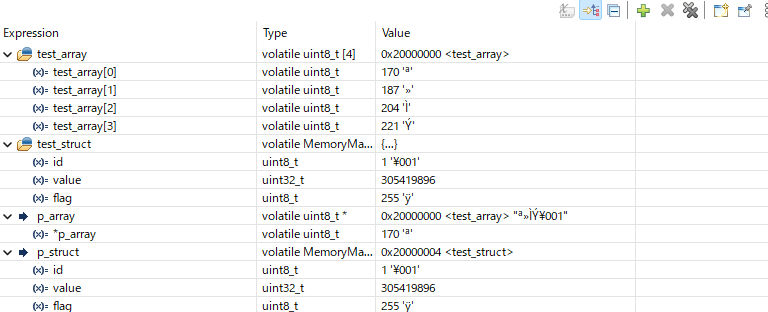
How to read the display (this order works):
- Check
p_array’s Value (0x20000000 <test_array>) - Check
p_struct’s Value (0x20000004 <test_struct>) - Expand
test_arrayto confirmAA BB CC DD - Expand
test_structto confirmid = 1/value = 0x12345678/flag = 0xFF
Quick reference table:
| Item to look at | What it tells you |
|---|---|
p_array |
Start address of test_array |
p_struct |
Start address of test_struct |
test_array (expanded) |
Array contents (AA BB CC DD) |
test_struct (expanded) |
Struct contents (id / value / flag) |
Key points:
test_array/test_structare “the contents themselves”p_array/p_structare “the address where those contents live”- In the Memory view, you use the address from
p_array/p_structto go look at the contents
2-3. Observing the Actual Byte Layout in the Memory View
Enter the value of p_array (0x20000000) into the Memory view, and you’ll see the actual data of test_array at that address:
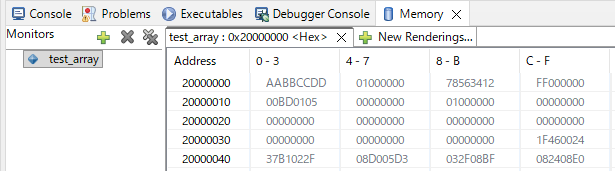
The Memory view shows memory contents as hexadecimal bytes. The left edge is the Address, and the data appears in 4-byte groups to the right.
What you can read from this display:
- Address 20000000:
AA BB CC DD— the actual data oftest_array - 4 bytes later:
01 00 00 00 78 56 34 12 FF 00 00 00— the actual data oftest_struct - Data is packed with no gaps: both the array and struct are laid out in declaration order
Key understanding
p_arrayis a variable recording wheretest_arraylives (address0x20000000)- Entering that address in the Memory view shows
test_array’s actual contents (AA BB CC DD)- The Memory view is a tool for “seeing what’s at a given address”
Observation order (follow this if lost)
- Find
AA BB CC DDfirst (the array)- Confirm
01 00 00 00 ... FF 00 00 00(the struct with padding)- Last, confirm
78 56 34 12(little-endian)
Three important observations:
① Array Contiguity
What to check: Are test_array’s 4 bytes laid out with no gaps?
Memory view display (Address 20000000):
Address      +0  +1  +2  +3
20000000:    AA  BB  CC  DD
AA, BB, CC, DD are packed together with no gaps whatsoever.
② Struct Padding
What to check: In test_struct, where are the 00-filled gaps after 01 and FF?
Memory view display (same row at Address 20000000):
The row shows 16 bytes (0x10 bytes):
Address      +0  +1  +2  +3  +4  +5  +6  +7  +8  +9  +A  +B  +C  +D  +E  +F
20000000:    AA  BB  CC  DD  01  00  00  00  78  56  34  12  FF  00  00  00
             ~~~~~~~~~~~~~~  ~~~~~~~~~~~~~~  ~~~~~~~~~~~~~~  ~~~~~~~~~~~~~~
              test_array      id+padding       value(LE)     flag+padding
In detail:
- +0 to +3:
AA BB CC DD→test_array[4] - +4:
01→test_struct.id - +5 to +7:
00 00 00→ padding (auto-inserted gap) - +8 to +B:
78 56 34 12→test_struct.value(little-endian for0x12345678) - +C:
FF→test_struct.flag - +D to +F:
00 00 00→ padding (to make the struct a multiple of 4 bytes)
③ Little-Endian Byte Order
What to check: Is 0x12345678 stored as 78 56 34 12 in reversed byte order?
Look at +8 to +B: 78 56 34 12.
This shows that the 0x12345678 we wrote is stored in memory with reversed byte order. STM32 (ARM Cortex-M) uses little-endian, which means:
- Low byte at low address
- High byte at high address
How 0x12345678 is stored (little-endian):
Address   Value    Meaning
+8(+0):   78   ←  Least Significant Byte (LSB)
+9(+1):   56
+A(+2):   34
+B(+3):   12   ←  Most Significant Byte (MSB)
Difference from big-endian Some CPUs (old Motorola-based architectures, etc.) use big-endian (high byte at low address). When exchanging binary data between different CPU architectures, byte order is critical.
Section 2-3 summary:
From the Memory view, we confirmed three things:
- Arrays are contiguous with no gaps (
AA BB CC DD) - Structs have padding inserted (
00 00 00after01, and afterFF) - Data is stored in little-endian (
0x12345678stored as78 56 34 12)
✅ Chapter 2 Checklist
- Confirmed
p_arrayandp_structvalues in the Expressions view - Found
AA BB CC DDin the Memory view - Identified the
00bytes after01and afterFFas padding - Can explain why
0x12345678appears as78 56 34 12
3. The Essence of Arrays: Contiguity in Memory
3-1. Arrays = Contiguous Placement with No Gaps
Arrays guarantee that same-type data is laid out in memory with absolutely no gaps between elements. This is strictly defined by the C standard, and it’s the foundation that makes pointer arithmetic possible.
Just remember this An array is “a region where the same type is packed with no gaps.” That’s why position is determined by
start address + index × type size.
The test_array we observed in section 2-3 shows this in the Memory view:
Address      +0  +1  +2  +3
20000000:    AA  BB  CC  DD
3-2. Why Contiguity Matters
Q: Why does “being contiguous” matter?
A: Because you can calculate the address of any element with simple arithmetic.
If test_array[0] is at 0x20000000:
test_array[1]=0x20000000 + (1 × 1 byte)=0x20000001test_array[2]=0x20000000 + (2 × 1 byte)=0x20000002test_array[3]=0x20000000 + (3 × 1 byte)=0x20000003
With the formula “start address + index × type size”, any element can be accessed instantly.
Common stumbling point The address of
test_array[0]is the same as the start address of the entire array. When confused, just remember “index 0 = the start.”
3-3. Confirming Different Type Sizes
Our experiment code uses uint8_t for the array, but looking at test_struct.value from section 2-3, we can see uint32_t occupies 4-byte units.
Revisiting the Memory view:
test_struct starts at +4 of Address 20000000:
+4:    id       (1 byte:  01)
+5~+7: padding  (3 bytes: 00 00 00)
+8~+B: value    (4 bytes: 78 56 34 12)
+C:    flag     (1 byte:  FF)
+D~+F: padding  (3 bytes: 00 00 00)
uint32_t tells the microcontroller “read 4 bytes from here as a single unit, interpreting as little-endian.”
The type size determines how many bytes the address advances per step — that’s C’s fundamental principle.
3-4. Why Contiguity Enables High-Speed Processing
This physical contiguity is what lets microcontrollers process large amounts of data quickly and correctly.
DMA (Direct Memory Access) works by issuing the command “transfer this many bytes starting from this address” — no CPU involvement needed. This mechanism fundamentally depends on arrays being contiguous.
DMA is covered in detail in Episode 10 DMA transfers data between memory regions or between memory and peripherals without involving the CPU. Array contiguity makes this high-speed transfer possible.
✅ Chapter 3 Checklist
- Can explain why arrays use contiguous placement
- Can use the
start + index × type sizecalculation - Understands why
uint8_tanduint32_tadvance addresses by different amounts
4. Struct Padding and Alignment — Why Gaps Appear
4-1. Structs = Grouping Different Types
Like MemoryMapTest_t in chapter 2, structs let you group different types of data as a single unit. But in memory, a hidden element called padding appears.
The 00 00 00 bytes we saw in chapter 2 are exactly this padding.
Just remember this Structs “lay out members in declaration order,” but the CPU may insert gaps (padding) along the way.
4-2. The “Wasted Gap” Reality in the Memory View
The memory layout of test_struct from section 2-3:
Address      +0  +1  +2  +3  +4  +5  +6  +7  +8  +9  +A  +B  +C  +D  +E  +F
20000000:    AA  BB  CC  DD  01  00  00  00  78  56  34  12  FF  00  00  00
                             ^^  ~~~~~~~~~~  ~~~~~~~~~~~~~~  ^^  ~~~~~~~~~~
                             id  padding     value (LE)    flag  padding
(test_struct starts at +4 bytes from Address 20000000)
id(1 byte):01- Padding (3 bytes):
00 00 00(auto-inserted gap) value(4 bytes):78 56 34 12(little-endian for0x12345678)flag(1 byte):FF- Padding (3 bytes):
00 00 00(gap to make struct a multiple of 4 bytes)
The actual struct size:
sizeof(MemoryMapTest_t) = 12 bytes
// Breakdown: 1(id) + 3(padding) + 4(value) + 1(flag) + 3(padding) = 12 bytes
4-3. Why Gaps Form — Alignment Constraints
Q: Why does the compiler deliberately create wasted gaps?
A: To place data at positions the CPU can read/write efficiently.
Common stumbling point Padding looks “wasteful,” but it’s actually a necessary cost for the CPU to read/write quickly and safely.
32-bit CPUs (like Cortex-M4) have these physical constraints:
| Data Type | Size | Recommended Alignment | Reason |
|---|---|---|---|
uint8_t |
1 byte | Any address | 1-byte read/write possible anywhere |
uint16_t |
2 bytes | Multiple of 2 | Fastest at 2-byte boundary |
uint32_t |
4 bytes | Multiple of 4 | Fastest at 4-byte boundary |
Example:
- Placing
uint32_tat an odd address like0x20000001may require 2 read operations (worst case). - At a 4-aligned address like
0x20000004, one instruction suffices.
The 24-byte stack frame from Episode 2 is also a result of alignment — management data is packed in 4-byte units following the same rules.
The compiler deliberately inserts padding to place each member at an efficient position.
Our code uses __attribute__((aligned(4))) to ensure the struct itself is 4-byte aligned, giving more stable observation results.
What happens if alignment is violated? On STM32’s Cortex-M4, alignment violations (e.g., reading
uint32_tfrom a non-4-byte-boundary) don’t crash the program, but require extra clock cycles and reduce performance. Some older ARM cores raise a hardware exception (fault) on alignment violations and halt the program.
4-4. RAM-Saving Technique — Reordering Members
Simply arranging struct members from largest to smallest can minimize padding and save RAM.
Before (12 bytes):
typedef struct {
  uint8_t  id;        // 1 byte
  // ★ 3 bytes of padding
  uint32_t value;     // 4 bytes
  uint8_t  flag;      // 1 byte
  // ★ 3 bytes of padding
} MemoryMapTest_t;  // Total: 12 bytes
After (8 bytes):
typedef struct {
  uint32_t value;     // 4 bytes (largest first)
  uint8_t  id;        // 1 byte
  uint8_t  flag;      // 1 byte
  // ★ 2 bytes of padding (to make struct a multiple of 4)
} MemoryMapTest_Optimized_t;  // Total: 8 bytes
Memory layout comparison:
// Before (12 bytes)
Address      +0  +1  +2  +3  +4  +5  +6  +7  +8  +9  +A  +B
2000xxxx:    01  00  00  00  78  56  34  12  FF  00  00  00
             id  padding      value          flag padding

// After (8 bytes) — members reordered
Address      +0  +1  +2  +3  +4  +5  +6  +7
2000xxxx:    78  56  34  12  01  FF  00  00
             value          id  flag padding
A 4-byte savings achieved. In resource-constrained embedded systems, this kind of optimization is essential knowledge.
💡 Practical tip With a large struct used many times (e.g., an array of 1000 structs), 4 bytes per struct means
4 × 1000 = 4,000 bytes ≈ 4 KBdifference. On a microcontroller with only 64 KB of RAM, that’s significant.
✅ Chapter 4 Checklist
- Can explain why 3 bytes of gap appear after
id - Can give the breakdown of
sizeof(MemoryMapTest_t) = 12 - Understands why changing member order reduces size
5. What volatile Means: A Warning to the Compiler (Foreshadowing)
The experiment code in chapter 2 used volatile in the variable declarations as a prerequisite for observation. Let’s clarify what it means.
Just remember this
volatilemeans “please read from memory every time.” Use it for variables that hardware or interrupts might change.
5-1. What Is Compiler Optimization?
Normally, the compiler decides: “this variable’s value hasn’t changed in the program, so I’ll reuse the register value instead of reading memory again.”
Example: code that might be optimized
int counter = 0;
counter++;
counter++;
int result = counter;  // ← compiler might decide to just write "2" directly
This optimization is a good feature in normal programs — it speeds up execution.
5-2. The Embedded Problem: Changes from “Outside”
In embedded systems, however, values frequently change from “outside” the program (hardware or interrupts).
Example: GPIO input register (covered in detail in Episode 4)
uint32_t* gpio_input = (uint32_t*)0x40020010;  // GPIO input register
int value1 = *gpio_input;  // First read: button not pressed → 0
// ← button gets pressed here
int value2 = *gpio_input;  // Second read: button pressed → 1
If the compiler optimizes this, it might decide: “reading the same address twice, I’ll just reuse the first read” — and value2 would be 0 even though the button was pressed.
5-3. The Role of volatile: Suppressing Optimization
- The role of
volatile: Tells the compiler “this variable might change at any moment without warning — read from memory every single time.”
volatile uint32_t* gpio_input = (uint32_t*)0x40020010;
int value1 = *gpio_input;  // always reads from memory
int value2 = *gpio_input;  // reads again (not optimized away)
Common stumbling point
volatiledoes not guarantee thread safety or mutual exclusion. Its role is purely “prevent the read/write from being optimized away.”
5-4. When to Use volatile
| Case | Reason | Example |
|---|---|---|
| Hardware registers | Hardware changes the value | GPIO, UART, timer registers |
| Variables shared with interrupts | Interrupt handler changes the value | Flags, counters |
| Multi-threaded environments | Another thread changes the value | Shared variables with RTOS |
| Debugger observation | Prevent compiler from eliminating the variable | Our experiment code |
Important note:
Excessive volatile inhibits optimization and reduces execution speed. Using it only where necessary is the professional approach.
Why this matters will become clear in Episode 4’s “Register Operations.”
✅ Chapter 5 Checklist
- Can list 3 or more situations where
volatileis needed - Can explain that the purpose is “suppression of optimization”
- Can explain why not to make everything
volatile
6. Summary — Why C Has Been Embedded’s Common Language for 50 Years
This article explored how C variables, arrays, and structs are physically arranged in memory, confirmed with real addresses.
6-1. Review of Key Points
-
Variable = Memory Every C variable has a one-to-one correspondence with a physical memory address. This is why C is called “close to the hardware.”
-
Array = Contiguous Array elements are laid out with no gaps. This contiguity enables index-based address calculation and high-speed DMA transfers.
-
Struct = Layout Invisible “padding” is inserted by the CPU’s alignment requirements. Smart member ordering can save RAM.
-
The Role of volatile An essential keyword for hardware control, ensuring the actual memory state is always reflected. Use only where necessary.
6-2. The Fundamental Reason C Keeps Being Chosen
What we learned today relates to why C has been used in embedded development for over 50 years:
- Standard-guaranteed layout: The C standard mandates member ordering, making layout predictable
- Language simplicity: Pointer access to any address with no complex abstraction layer
- Experience and track record: Decades of use, comprehensive microcontroller vendor support, enormous reference base
- Controllability: Fine-grained control of compiler behavior through keywords like
volatile
These properties perfectly match the embedded system requirement of “reliable operation with limited resources.”
6-3. Looking Ahead
Episode 4 finally dives into hardware register manipulation. The knowledge of “addresses,” “volatile,” and “struct layout” from this article all connect there.
What you’ll learn:
- What are peripheral registers (GPIO, UART, timers)?
- Why does writing a value to a specific address make hardware respond?
- Where
volatilereally shines - Real examples of register definitions using structs
Armed with memory map knowledge, let’s step into the world of directly controlling hardware.
References
Official Documentation
Technical specifications in this article are based on STMicroelectronics official documentation:
-
STM32F401xD/xE Datasheet (PDF) Basic specifications including electrical characteristics, pinout, and memory configuration.
-
STM32F4xx Reference Manual (PDF) Detailed peripheral usage and register configuration (1700+ pages). Covered in detail in later episodes.
C Language Standard
- ISO/IEC 9899 (C Language Standard)
Array contiguity, alignment, and
volatilebehavior are strictly defined by the C standard.
Next Up
#4: The World of Bits — Register Operations and the BSRR Design
📖 Previous Episode
📚 Next Episode
Episode 4: "The World of Bits — Register Operations and the BSRR Design"
Registers are collections of bits. Mask operations, shift operations, RMW hazards, and the elegant BSRR design.
📍 Series Index